An agent can read a PDF and give a convincing answer. That does not prove a document analyzer ever saw the file.
This distinction matters when I want more than a summary. I want to see the fields Azure Content Understanding actually extracted, the confidence it returned for each one, and the source evidence I can inspect before using the result. I started with a small, read-only experiment and tested the handoff in Copilot Studio itself.
The experiment now has a concrete result: a manually selected PDF went through Content Understanding's native Analyze Content action and into a Copilot Studio workflow's Agent node. The three typed values, confidence scores, source locations, and spans displayed by the agent matched the action's actual output. That is a successful workflow handoff; it is not proof that an attachment in an agent's Preview chat is automatically passed to the same action.
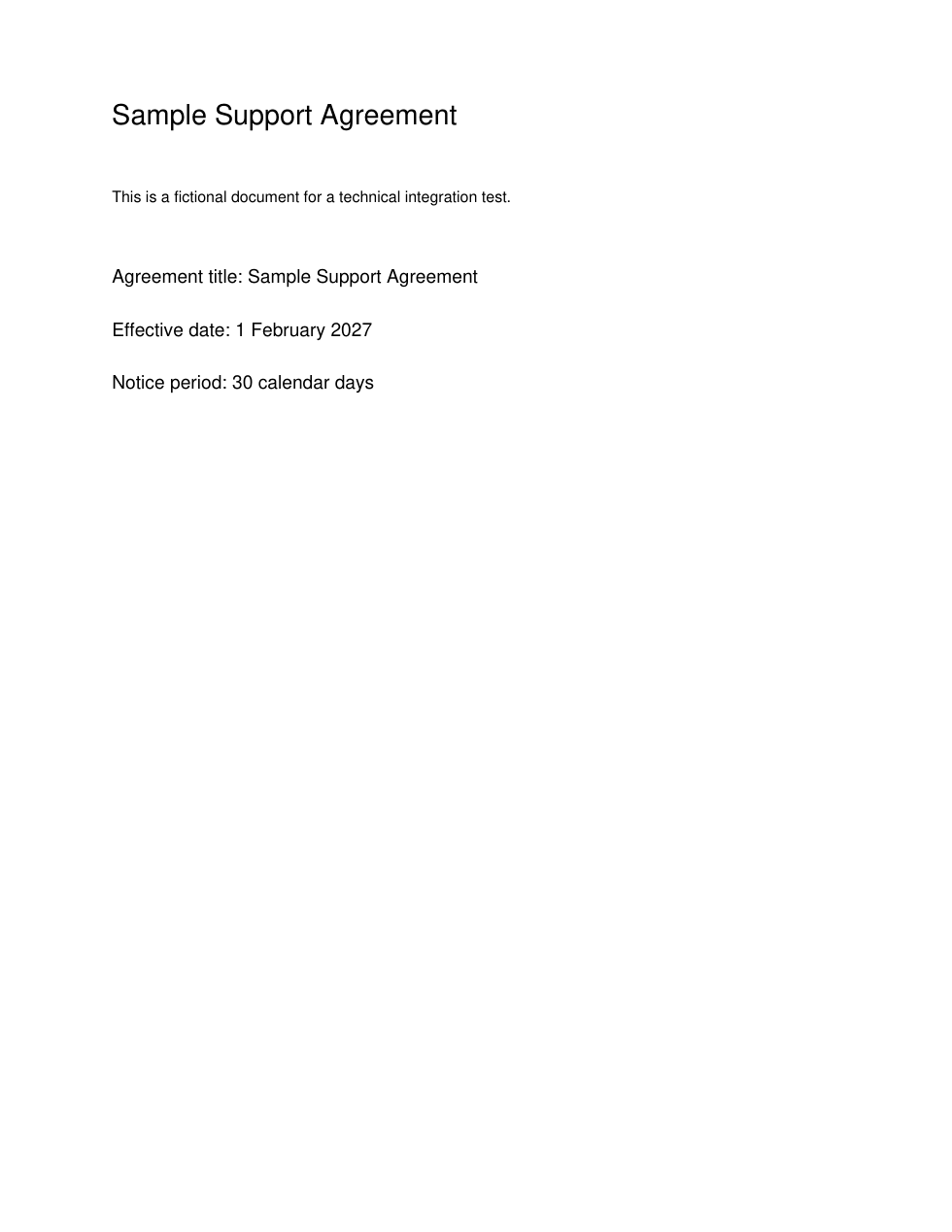
The test document is a fictional one-page "Sample Support Agreement." I make a PDF containing only these known facts:
Agreement title: Sample Support Agreement
Effective date: 1 February 2027
Notice period: 30 calendar days
Keeping the first test small makes it possible to check every extracted value against the PDF before trying longer documents.
Why the file handoff is the hard part
In an agent powered by the GitHub Copilot harness, a chat attachment is available for the agent to read during the conversation. It is not evidence that a connector received the original PDF bytes. Azure Content Understanding's Analyze Content action needs file content or a URL its service can access. A local filename, an agent-generated summary, and a URL requiring an unrelated interactive sign-in are not substitutes.
The smallest documented path is one native Copilot Studio Workflow, not a custom connector: a manual File input, the built-in Azure AI Content Understanding action, and an Agent node to present the result. Run provides a file picker; I can inspect each step's real inputs and outputs in Activity. The connector is labeled Preview, so I am treating this as a read-only experiment, not a production rollout.
Step 1: Make the analyzer return evidence
In Content Understanding Studio, I start with Document Analysis, rather than assuming the similarly named Contract or Invoice template matches this simple test. I use a custom document analyzer, based on prebuilt-document, with three clearly described fields: AgreementTitle, EffectiveDate, and NoticePeriod. The built analyzer ID is what the workflow uses; the Foundry project URL is not the connector endpoint.
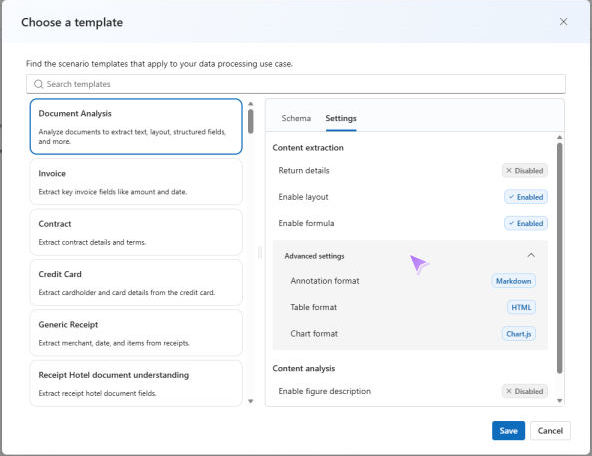
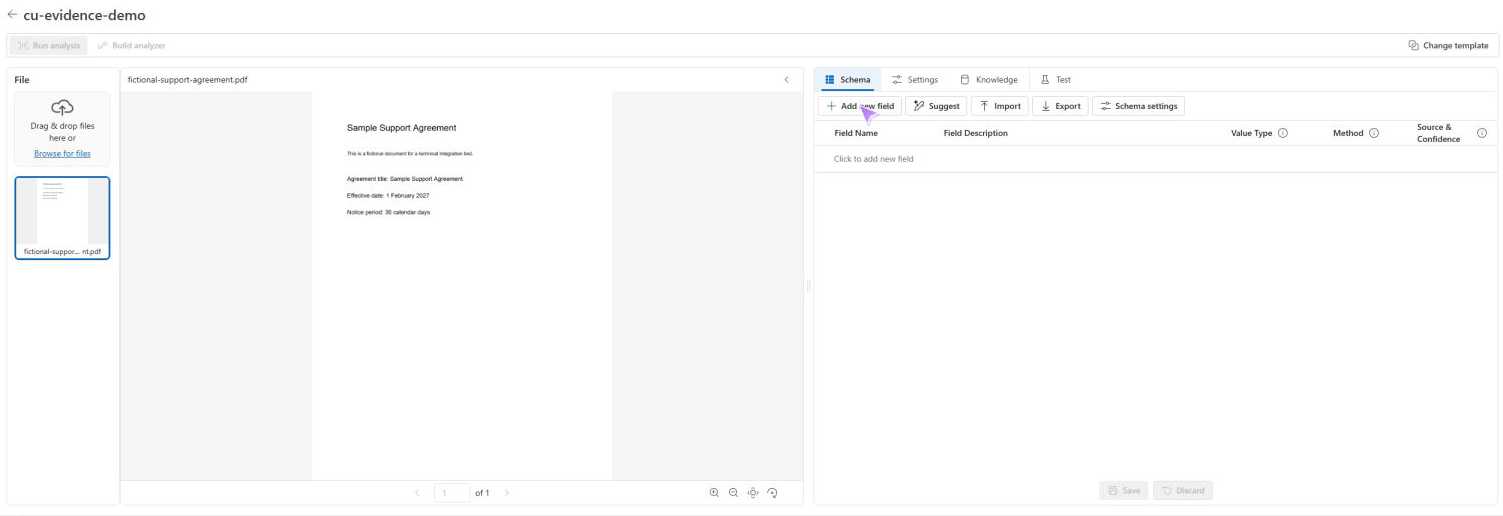
Field confidence and source estimation are opt-in. The analyzer configuration can specify estimateFieldSourceAndConfidence: true; each field can specify estimateSourceAndConfidence: true, which is required when that field uses method: "extract". I learned not to trust a checkbox alone: in my initial Studio build, all three Source & Confidence switches appeared on, but the downloaded definition contained neither setting. A read-only REST GET confirmed that the built analyzer also lacked them.
My first attempt to test that analyzer in Studio returned a generic Network Error. That message did not tell me whether the analyzer, file, browser, or service had failed, so I did not treat it as an extraction result. I verified the resource endpoint and used the documented API to create a separate evidence-enabled version with the global and three field-level settings explicitly enabled. I then read back its built definition: it was ready, the four evidence switches were true, and there were no build warnings. The original analyzer remained untouched.
The two settings I checked in the built definition look like this (illustrative excerpt; the other two fields follow the same pattern):
{
  "config": { "estimateFieldSourceAndConfidence": true },
  "fieldSchema": {
    "fields": {
      "AgreementTitle": {
        "type": "string",
        "description": "The agreement title stated in the document.",
        "method": "extract",
        "estimateSourceAndConfidence": true
      }
    }
  }
}
I ran the fictional PDF through this second analyzer with the REST API before involving any agent. The actual result contained one content item, no warnings, and the three expected fields:
| Field | Returned value | Returned confidence |
|---|---|---|
| Agreement title | Sample Support Agreement | 0.926 |
| Effective date | 2027-02-01 | 0.958 |
| Notice period | 30 calendar days | 0.946 |
Each field also had an encoded source and spans offsets into the extracted text. The date was normalized from the PDF's "1 February 2027"; that is an expected representation change, not a different date. These are the service's actual scores for this one synthetic run, not accuracy rates or a promise about other documents. This established a baseline that I could compare with a separate run through Copilot Studio.
For the connection, I use the Content Understanding endpoint of the Azure resource that hosts the analyzer. In the Azure portal, I open that resource's Keys and Endpoint page (or its listed endpoints) and copy the Content Understanding URL exactly. I do not use the Foundry project URL, substitute a generic example, or guess between cognitiveservices.azure.com and services.ai.azure.com; the hostname depends on the resource. In my environment, the resource-specific Content Understanding endpoint, not the generic resource endpoint, was the right value.
I create a connection in Power Automate > Connections > New connection > Azure AI Content Understanding, select Microsoft Entra ID Integrated, enter that endpoint, and sign in with an identity allowed to analyze content. Cognitive Services Content Understanding Reader provides analysis permission without analyzer-authoring access. The integrated connection is not shareable; another maker needs their own connection. This uses the built-in connector, not a custom connector or a new app registration.
Step 2: Prove the file reached the analyzer
In Copilot Studio, I open Workflows > New workflow, add a manual trigger, and give it a File input named DocumentFile. I select Add a step > Azure AI Content Understanding > Analyze Content. I set Analyzer ID to the built analyzer and bind File Content to the trigger's actual file-content token, not its name or the whole file object. If I only see a filename, I stop and inspect the trigger output rather than guessing at a file path. I specify application/pdf if the action asks for a MIME type and leave Range blank to analyze the whole PDF.
I publish the workflow, select Run, choose the synthetic PDF in the manual File input, and open the run in Activity. This invokes a potentially billable service; it is a real analysis, not a mock answer from the agent.
For a valid proof, the action must finish successfully and return top-level status and id, the expected result.analyzerId, and at least one field in result.contents[].fields. I inspect all content items and result.warnings, not just the first item's _markdown shortcut. The REST result I verified used type-specific value properties: valueString for the title and notice period, and valueDate for the date. The connector's actual output used those same type-specific properties; it did not use a generic value field. Each field also contained confidence, source, and spans. Confidence is optional and is a number from 0 to 1 when present; 0 is a real score, while a missing score is "unavailable." I keep the service's encoded source value and its span offsets instead of inventing a citation.
If the action fails, returns no fields, or does not return the evidence I need, I report that state explicitly. A failure must not become a plausible-looking success.

A connected connection was not enough
My first workflow run failed with 401 Unauthorized at Analyze Content, and the Agent node was skipped. The action's inputs showed the original PDF bytes (Base64 beginning JVBER), the intended analyzer ID, and application/pdf. Separately, a read-only request using my signed-in Azure identity retrieved the ready analyzer from the resource's Content Understanding endpoint. Those observations narrowed the issue to the connector's runtime authentication or endpoint path; they did not establish whether the existing API key was wrong, stale, or used incorrectly.
I created a separate Microsoft Entra ID Integrated connection using the resource's verified Content Understanding endpoint. I switched only the synthetic workflow's Analyze Content action to that connection, saved, reloaded to check that the connection and inputs persisted, and republished. I did not change the original API-key connection. Its Connected badge had not guaranteed a successful analysis; the next real workflow run did.
Step 3: Hand the real result to an agent
In the same workflow, I added an Agent node after the CU action. I chose New agent for this workflow, attached no write tools, and asked it to display the analyzer's actual result.contents[].fields, including each field's typed value, returned confidence, raw source/spans, and any warnings. I inserted the CU step's Body / Result as dynamic content in its instructions; a filename or an agent-authored summary would not have been a substitute. I asked it to say "unavailable" for absent confidence, preserve a genuine 0, and never estimate a value.
On the approved second PDF run, Start, Analyze Content, and Report CU evidence all succeeded in Activity. Analyze Content took 7.54 seconds and returned status: Succeeded, the expected analyzer ID, one content item with the three fields above, and warnings: []. I inspected its raw result.contents[0].fields: the typed values, scores 0.926 / 0.958 / 0.946, encoded page-1 sources, and spans matched the Agent node's response. The Agent node took 17.69 seconds and displayed the evidence and empty warnings. This is the end-to-end handoff I could actually verify, not a reconstructed answer from the PDF.
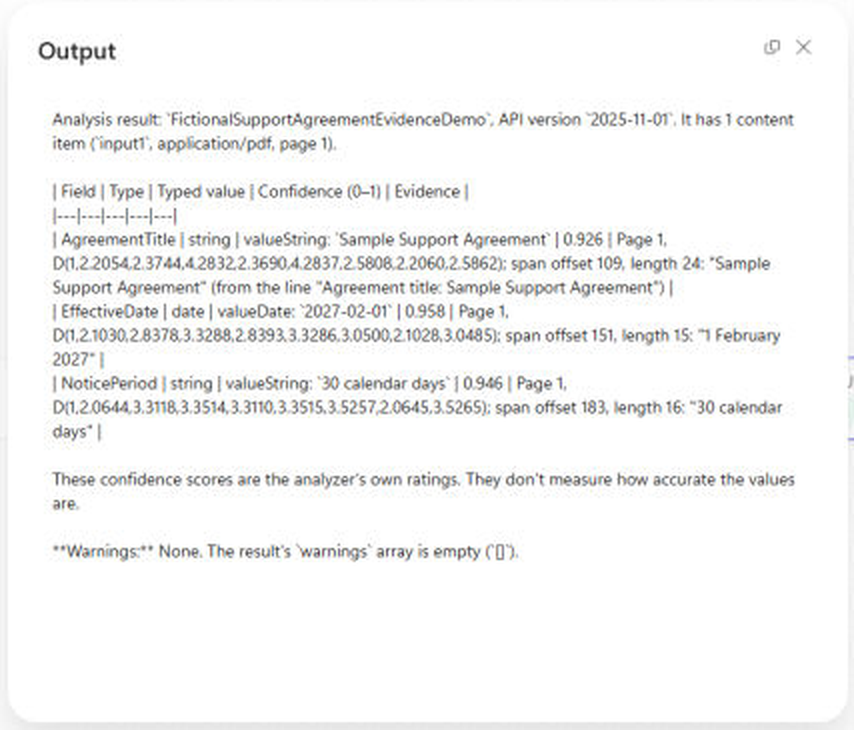
This shows the result inside Copilot Studio's workflow and exercises a GitHub-harness agent with genuine CU output. It does not mean that uploading a PDF to the agent's Preview chat automatically binds that attachment's bytes to this manual-trigger workflow. Those are separate input surfaces.
If I also need the same completed result in Preview chat, I can save a compact, access-controlled result under an analysis ID, then give the agent a short, read-only lookup workflow: When an agent calls the flow > Get a row by ID > Respond to the agent. I must publish that tool with Asynchronous response Off and verify that it returns within 100 seconds. Keeping the potentially long document-analysis call in the file-input workflow avoids that synchronous reply limit. In Preview, I would check the agent's activity trace for the lookup tool call and compare its answer with the saved CU response. This chat lookup is a separate validation step, not something I can claim happened merely because the manual workflow succeeded.
An analysis ID is a lookup key, not authorization. If I implement that lookup, I would keep the test agent and result store private; a multi-user deployment needs caller-aware access checks before it can expose someone else's analysis through a shared connection.
For a small document, a directly agent-callable workflow could retrieve an approved PDF from a private file store, pass its content to CU, and reply in chat if the original-byte binding works and the real run stays below 100 seconds. A Preview chat attachment alone does not establish that binding.
Confidence is not the same thing as accuracy
Content Understanding's score estimates certainty about an extracted field. It is not a measured accuracy percentage for my document collection. I still compare the returned values with a small set of labeled, known-good documents and inspect the supporting source locations. A high score attached to the wrong value is still wrong.
This one-page run is not a measured evaluation on longer, varied documents, and I have not yet compared multiple agent models. My next validation set would use variations of the synthetic document: one straightforward layout, one with the notice period buried in a paragraph, and one with the value missing. For each run I would compare the analyzer's raw fields with the agent node's display, and with Preview chat only after implementing the separate lookup. If I try a different agent model, I will keep the analyzer and PDF fixed; a changed confidence value in the agent's response is a display problem to investigate, not evidence the analyzer became more accurate.
That is the part I find most useful about this architecture: the agent can explain a result, but the workflow gives me a traceable analyzer response and a clear place to put human review before any downstream action. The first milestone is complete: PDF bytes in, real analyzer fields out, the same evidence in the workflow's agent-node output. Chat retrieval and real-document evaluation are additional milestones; I would not automate anything beyond reading and review until they are verified.
References
- Create a custom analyzer in Content Understanding Studio
- Configure confidence and grounding for document analysis
- Analyzer configuration reference
- Create an analyzer with the REST API
- Analyze a document and inspect its result
- Azure AI Content Understanding connector reference
- Azure RBAC role: Cognitive Services Content Understanding Reader
- How attachments work in a GitHub-harness conversation
- Test a workflow and inspect Activity in Copilot Studio
- Add a workflow as an agent tool, including the 100-second limit
- Create Dataverse tables and columns
- Retrieve a Dataverse row by ID
- Add an agent node to a GitHub-harness workflow
- Use the agent activity trace to verify tool calls


Leave a Reply